Rob Run Cheats for PC

ROB RUN Cheats & Hacks for PC. Aimbot, ESP, Loot Radar & Vehicle Tracking

Explore ROB RUN Cheats for PC featuring Player ESP, customizable Aimbot, Vehicle ESP, Loot and Stash Tracking, 2D Radar, Hideout Highlights, and configurable aim settings.

Player and world markers inside a ROB RUN building

Yes

Stream-safe

<24h

Patch speed

300+

Users

24/7

Support

Soft aimbot
Player ESP
Vehicle ESP
Loot ESP
2D radar
Hideout markers
No recoil
Movement assist
Saved configurations
Windows 10 & 11
ROB RUN on Steam
Cloud DMA required
HVCI
Core Isolation
TPM
Secure Boot
Soft aimbot
Player ESP
Vehicle ESP
Loot ESP
2D radar
Hideout markers
No recoil
Movement assist
Saved configurations
Windows 10 & 11
ROB RUN on Steam
Cloud DMA required
HVCI
Core Isolation
TPM
Secure Boot

Features

Advanced ROB RUN Cheats Features

Our ROB RUN Cheats gives you a powerful collection of customizable Aimbot, Player ESP, Vehicle ESP, and World ESP features. Track players, identify character roles, locate valuable loot, and monitor nearby activity with detailed visual indicators, 2D Radar, and personalized gameplay settings.

Advanced Aimbot

Customizable Targeting & Precision Control

Enhance your aiming experience with adjustable Soft Aimbot settings designed to give you greater control over target selection and aiming behavior. Customize targeting range, smoothness, and bone selection while filtering unwanted targets to suit different combat situations.

  • Custom Aim Key: Assign a preferred key to activate or deactivate the Aimbot.
  • Adjustable FOV: Customize the targeting radius and display it with the Draw FOV option.
  • Smooth Aim Control: Adjust aiming smoothness for more gradual target movement.
  • Bone Selection: Choose Head, Neck, Chest, or Closest as your preferred targeting point.
  • Smart Target Filters: Configure Visible Check, target priority, and teammate, clan, or civilian exclusions.
Soft Aimbot
FOV Control
Smooth Aim
Bone Selection
Target Priority
Visible Check
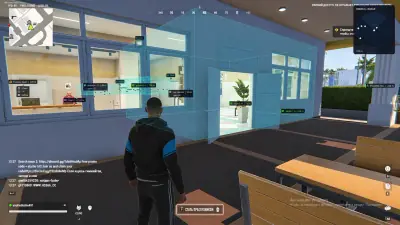
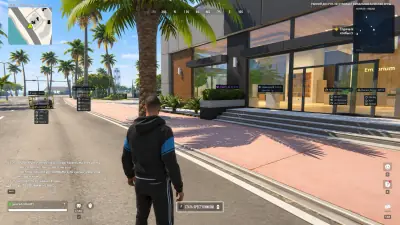
Player ESP

Detailed Player Information & Visual Awareness

Stay informed about nearby characters with customizable Player ESP indicators. Display essential player information, distinguish Criminals, Cops, and Civilians, and use multiple visual elements to identify and monitor characters throughout the environment.

  • Box & Skeleton ESP: Highlight player positions using Full Boxes, Corner Boxes, and Skeleton indicators.
  • Player Information: Display names, aliases, health bars, armor, shields, and distance.
  • Role & Status Indicators: Identify Criminal, Cop, and Civilian roles alongside available Wanted and Heat State information.
  • Weapon & Vehicle Information: View held weapons and vehicle occupancy details.
  • Advanced Visual Indicators: Customize Snaplines, off-screen arrows, visible/hidden colors, and maximum player distance.
Player ESP
Box ESP
Skeleton ESP
Health Bar
Role ESP
Weapon ESP
Snaplines

Vehicle ESP

Vehicle Tracking & Essential Information

Keep track of vehicles around the map with dedicated Vehicle ESP options. Identify vehicle types, monitor their distance, and view useful vehicle information through customizable indicators that help you distinguish between available and occupied transportation.

  • Vehicle Identification: Display vehicle names to recognize different vehicle types.
  • Distance Indicators: View the distance between your position and nearby vehicles.
  • Occupancy Filter: Distinguish between empty and occupied vehicles.
  • Vehicle Status: Display available locked/unlocked, health, and fuel information.
  • Garage & Spawn Markers: Highlight garage locations and vehicle spawn points.
Vehicle ESP
Vehicle Names
Vehicle Distance
Vehicle Status
Garage ESP
Spawn Markers

World & Loot ESP

Locate Valuable Items, Objectives & Important Locations

Discover important resources and points of interest with customizable World and Loot ESP. Highlight loot containers, valuable items, weapons, ammunition, hideout entrances, and activity-related objectives to make important locations easier to identify while exploring the ROB RUN environment.

  • Loot & Stash ESP: Highlight loot containers and stash locations across the environment.
  • Cash & Valuable Markers: Identify cash and other valuable items with dedicated indicators.
  • Weapon & Ammo ESP: Locate available weapon and ammunition drops.
  • Location Highlights: Display safes, workbenches, hideout entrances, and NPC vendor locations.
  • Objective ESP: Track territory points, capture locations, heist objectives, and other important markers with adjustable world distance.
World ESP
Loot ESP
Stash ESP
Cash ESP
Weapon ESP
Hideout ESP
Objective ESP

2D Radar

A Configurable Overview of Nearby Activity

Get an additional perspective on your surroundings with the customizable 2D Radar. Monitor different entity types through a compact radar interface and adjust its range and display settings to keep important nearby information accessible.

  • 2D Radar Display: Enable an additional radar interface for monitoring nearby activity.
  • Adjustable Radar Range: Customize the radar range according to your preferences.
  • Player Indicators: Display nearby players on the radar.
  • Vehicle & Loot Tracking: Show vehicle and loot indicators for easier identification.
  • Location & Objective Markers: Include hideouts and important objectives in the radar display.
2D Radar
Player Radar
Vehicle Radar
Loot Radar
Hideout Radar
Objective Radar

Miscellaneous & Customization

Additional Controls & Personalized Settings

Customize your ROB RUN setup with additional gameplay adjustments and convenient menu controls. From recoil and spread options to custom crosshairs, shortcut keys, and configuration management, these settings give you more flexibility over how your features are configured and accessed.

  • No Recoil: Use the available recoil adjustment to customize weapon handling.
  • No Spread (Soft): Apply the available soft spread adjustment.
  • Movement Assist: Enable or disable the available Speed / Movement Assist option.
  • Custom Interface Controls: Configure your crosshair, menu key, and panic key.
  • Stream-Proof Overlay & Configs: Access the stream-proof overlay option and save or load your preferred feature configurations.
No Recoil
No Spread
Movement Assist
Custom Crosshair
Stream-Proof Overlay
Config System
Save & Load

Store

Our products

Compare the cheat menu and the utilities on this grid. Open a product page for the feature list and checkout.

HWID Spoofer for Supported Games

Disk serials, MAC addresses, and GPU IDs get a new pass. The cleaner in the license runs before the next sign-in.

After a hardware flag, this license rewrites disk serials. It also rewrites MAC addresses, GPU IDs, and related fingerprints. Trace cleanup is in the same license.

  • Disk serial rewrite
  • MAC rewrite
  • GPU ID rewrite

Cloud DMA

A Hyper-V environment for one Windows PC with guided installation and encrypted activation.

Cloud DMA requires GREENWARD, Static Server and AWS as separate purchases. Review all requirements before checkout.

  • Single-PC setup
  • Guided Hyper-V installation
  • Encrypted activation

Before checkout

Check the details for your setup

Review product features, requirements and current compatibility before purchasing.

  • Player information

    Player ESP lists roles, health, armor, weapons and distance.

  • Aim settings

    Adjust FOV, smoothing, aim key, bone selection and target priority.

  • World visibility

    Vehicle, loot, hideout and objective markers have their own categories.

  • Windows and Steam

    The listed game configuration is Steam on Windows 10 or 11.

  • Cloud DMA

    Cloud DMA is required for full functionality on supported builds.

  • Separate requirements

    Cloud DMA also requires GREENWARD, Static Server and AWS as separate purchases.

<24h

Patch turnaround

Usual time to ship a loader after a big ROB RUN or EAC update.

24/7

Support

Discord help for setup, configs and account issues.

300+

Users

PC players using aimbot, ESP and tools on robruncheatshub.com.

Setup guide

Prepare your setup in three steps

Review compatibility, required purchases and the provider’s setup instructions before launching.

  1. Check compatibility

  2. Review requirements

  3. Follow the setup guide

How it works

From requirements to your setup.

Review compatibility and separate purchases, then follow the provider’s instructions.

4 steps

  1. 01

    Check your PC

    Confirm your Windows version, Steam client and security settings.

  2. 02

    Review Cloud DMA

    Cloud DMA is required for full functionality on supported builds.

  3. 03

    Check the full setup

    GREENWARD, Static Server and AWS are separate Cloud DMA requirements.

  4. 04

    Follow the guide

    Review current compatibility and use the provider’s setup instructions.

Blog

Guides and updates

ESP and aimbot setup, menu tuning and patch-day checks for ROB RUN.

Considering ROB RUN cheats? Understand the difference between software reliability, system security, and account safety. Learn why third-party modifications always carry risks.

Starting ROB RUN for the first time? Understand its criminal sandbox gameplay, learn about the main roles, explore Looty Bay, and discover the basics of vehicles, heists, hideouts, and multiplayer progression.

Support

Stuck on setup or loader errors?

Use the FAQ next if you are still comparing options. For delivery, activation, or HWID issues, open a ticket and include the details from the checklist.

FAQ

Frequently asked questions

Review compatibility, features and requirements.